The ELLIPAL Titan Mini is a compact, air-gapped hardware wallet designed to store cryptocurrency private keys offline and sign transactions through QR codes.
The Mini is particularly appealing to cryptocurrency holders who want portable self-custody without regularly connecting their signing device to a computer. Its value ultimately depends on its transaction-verification capabilities, supported assets, mobile software, recovery flexibility, and whether its security architecture fits the owner's actual workflow.
Editor's Note (Oct. 24, 2026): We fully updated this ELLIPAL Titan Mini review in October 2026 with updated specifications, pricing, supported assets, and security features. We've expanded our coverage of air-gapped QR signing, secure-chip claims, firmware transparency, wallet recovery, DApp compatibility, and Bitcoin functionality. The review also includes an updated scorecard, setup guidance, and comparisons with the Titan 2.0, X Card, SafePal, Trezor, and Ledger to help readers assess whether the Mini is still worth buying.
ELLIPAL Titan Mini Review 2026: Quick Verdict
The ELLIPAL Titan Mini offers compact, air-gapped cryptocurrency storage with a 2.7-inch touchscreen, offline QR-code signing, and a metal-sealed enclosure. At its promotional $79 price, it provides an affordable alternative to larger touchscreen hardware wallets. Its main drawbacks are the smaller transaction-verification screen, repeated QR scanning, proprietary firmware, and dependence on ELLIPAL's mobile app.
Our take: The Titan Mini is best for mobile-first cryptocurrency holders who want offline private-key storage and occasional transactions without Bluetooth or USB data connections. Its touchscreen and metal construction distinguish it from cheaper QR wallets, but users needing advanced Bitcoin functionality, fully open-source firmware, or frequent complex transaction signing should consider alternatives.
Scorecard
-
1Security 4.6/5 Offline QR signing, a manufacturer-advertised CC EAL5+ Secure Chip, password protection, optional BIP39 passphrases, and a sealed metal body provide layered security. However, the complete wallet has not been established as independently certified, and malicious transaction approvals remain possible.
-
2Ease of Use 4.3/5 The 2.7-inch touchscreen and companion mobile app provide a straightforward workflow for account management and ordinary transfers. Repeated QR scanning, limited display space, offline firmware updates, and reliance on a proprietary security adapter introduce additional steps.
-
3Networks & Assets 4.3/5 ELLIPAL advertises support for more than 45 blockchains and 10,000 tokens, including Bitcoin, Ethereum, Solana, XRP, and BNB Chain. Ethereum and Polygon NFT support is also advertised. Advanced Bitcoin capabilities and some network-specific operations require further compatibility verification.
-
4DApps & Staking 3.9/5 The ELLIPAL app advertises WalletConnect, MetaMask integration, third-party swaps, cryptocurrency purchases, and selected staking services. Hardware authorization remains offline, but supported DApps, signing methods, providers, and staking assets vary. Third-party integrations introduce additional risks.
-
5Cost & Fees 4.4/5 The promotional $79 price makes the Mini competitive among touchscreen hardware wallets, with no subscription required for ordinary custody. Blockchain and third-party transaction charges still apply, while a replacement security adapter costs $29.90. The regular device price is $99.
-
6Custody & Transparency 4/5 The Titan Mini provides self-custody, offline recovery-phrase generation, optional passphrase protection, and BIP39-compatible recovery. However, its core firmware is not fully open-source, and independent verification of its signing implementation, physical protections, and advanced compatibility remains limited.
-
7Overall Score 4.7/5 The ELLIPAL Titan Mini offers a competitive balance of portable cold storage, touchscreen verification, broad advertised asset support, and affordable offline signing. Its strongest use case is occasional cryptocurrency management through a smartphone. Small-screen verification, QR friction, proprietary firmware, and uncertain specialist Bitcoin compatibility limit its appeal to advanced users.
Best For
- Long-term cryptocurrency holders seeking offline private-key storage
- Mobile-first users who prefer QR-code signing
- Budget-conscious buyers wanting a touchscreen hardware wallet
- Multichain holders managing mainstream cryptocurrencies
- Users making occasional transfers rather than frequent trades
Not Ideal For
- Users frequently signing complex smart-contract transactions
- Advanced Bitcoin users requiring verified PSBT, multisig, or specialist wallet integrations
- Users who require fully open-source wallet firmware
- Desktop-first users seeking direct computer integration
- Users who dislike repeated QR scanning or smartphone dependence
Disclosure and Methodology
Some links in this article may be affiliate links. If you choose to purchase a product or service through these links, we may earn a commission at no additional cost to you.
For this ELLIPAL Titan Mini review, we evaluated six categories: security, ease of use, supported networks and assets, DApp and staking functionality, cost and fees, and custody and transparency. Scores represent our editorial assessment of the documented capabilities, limitations, and trade-offs, rather than results from controlled product testing.
Our research used ELLIPAL's official product specifications, support documentation, firmware-update instructions, recovery guidance, asset compatibility information, and published security claims. We also examined documented capabilities and pricing for the ELLIPAL Titan 2.0, X Card, SafePal S1, Trezor Safe 3, and Ledger Nano S Plus.
Specifications, advertised functionality, and pricing were reviewed through Oct. 24, 2026. We did not conduct hands-on testing of the physical device. Manufacturer claims concerning secure-chip certification, tamper-triggered data wiping, and asset support were assessed as documented claims rather than independently verified test results.
Our final assessment considers the Titan Mini's air-gapped architecture, on-device transaction confirmation, purchase price, recovery flexibility, mobile software dependence, proprietary firmware, and limitations involving advanced Bitcoin workflows. Promotional prices, supported assets, integrations, and firmware capabilities may change.

ELLIPAL Titan Mini at a Glance
The Titan Mini provides the hardware required for offline key management and QR-based signing. Portfolio tracking, DApp connectivity, swaps, and staking are handled through the companion application and its supported integrations.
| Specification | ELLIPAL Titan Mini |
|---|---|
| Wallet type | Air-gapped, self-custody hardware wallet |
| Display | 2.7-inch touchscreen |
| Dimensions | 75 × 71 × 10.5 mm |
| Weight | 120 g |
| Construction | Aluminum-alloy, metal-sealed enclosure |
| Battery | 600 mAh rechargeable lithium-ion battery |
| Signing method | Offline QR-code signing |
| Connectivity | No Wi-Fi, Bluetooth, or USB data connection |
| Secure chip | Manufacturer-advertised CC EAL5+ Secure Chip |
| Physical security | Metal-sealed body and advertised tamper-triggered data wipe |
| Firmware updates | Offline through security adapter and microSD card |
| Mobile compatibility | Android and iOS |
| Recovery phrase | Generates 12 words; imports 12, 15, 18, 21, or 24 words |
| Passphrase support | Yes, optional BIP39 passphrase |
| Device password | Supported |
| Account management | Up to 10 accounts, subject to account type |
| Supported blockchains | 45+ advertised |
| Supported tokens | 10,000+ advertised |
| NFT compatibility | Ethereum and Polygon |
| DApp connectivity | Advertised MetaMask and WalletConnect support |
| Official US price | $79 promotional; $99 regular |
Specifications and pricing checked on Oct. 22. Supported assets, promotions and firmware capabilities may change.
What Does the ELLIPAL Titan Mini Offer? Features, Specifications, and Price
The ELLIPAL Titan Mini combines offline transaction signing with a compact metal body and touchscreen controls. Users manage their cryptocurrency through the ELLIPAL mobile app, while the hardware wallet retains the private keys needed to authorize outgoing transactions.
Unlike many hardware wallets that communicate with a connected computer through USB or Bluetooth, the Mini transfers transaction data using QR codes. Its design favors physical network isolation and smartphone compatibility, with some convenience sacrificed during transaction signing.
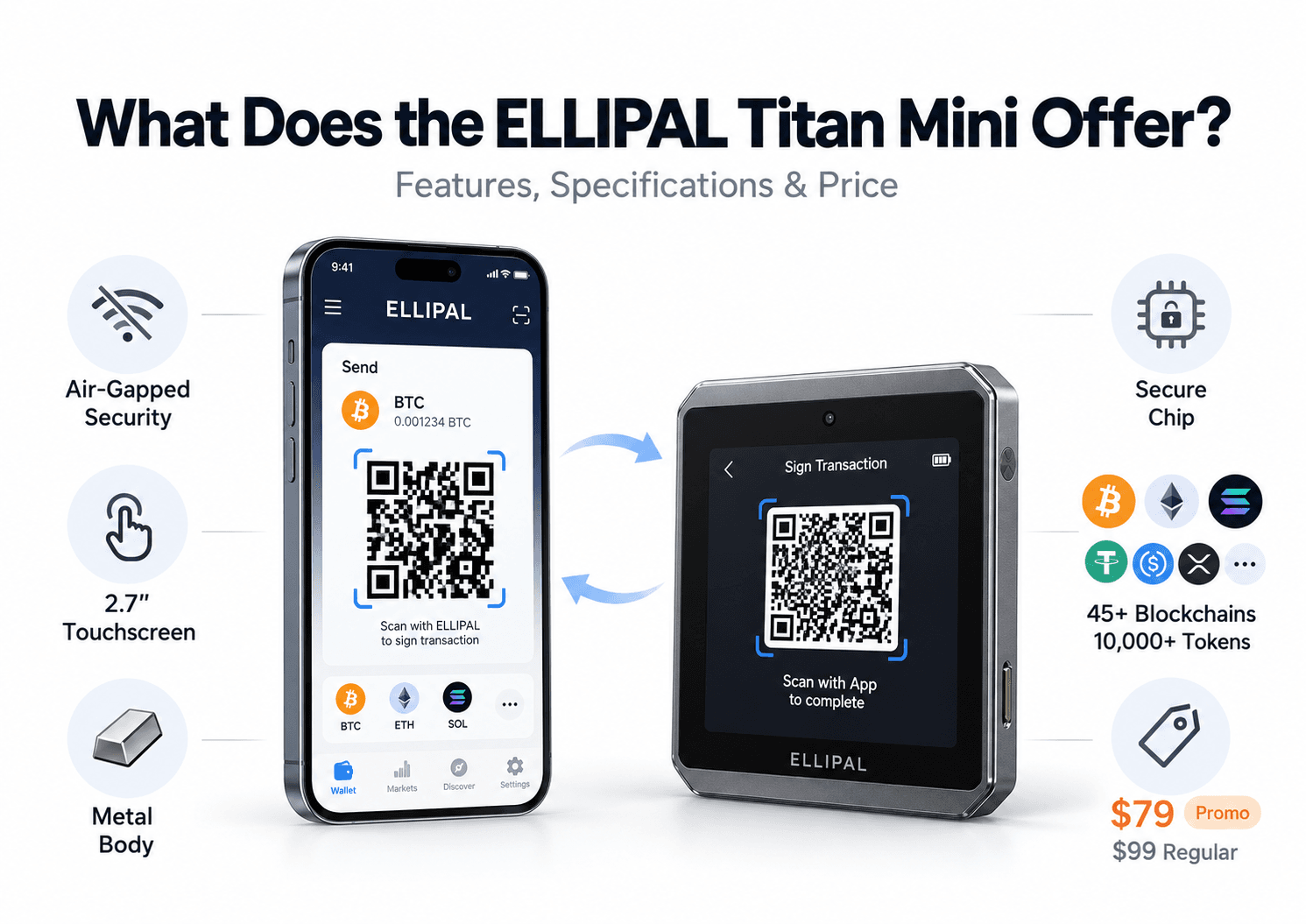
The hardware and mobile application perform separate jobs. The Mini creates and safeguards signing credentials, while the ELLIPAL app connects to blockchain networks, displays balances, and prepares transactions. Users can monitor their holdings on a smartphone without carrying the hardware device everywhere, but outgoing transfers still require its authorization.
The app also provides access to external cryptocurrency services. For example, a swap initiated within ELLIPAL may be executed by a third-party provider rather than ELLIPAL itself. Although the Mini signs the relevant transaction offline, execution, settlement, and any associated service fees remain governed by the external provider.
This arrangement makes the Mini suitable for users who want cold storage alongside mobile portfolio management. Those who prefer desktop software, direct computer integrations, or specialist Bitcoin tools have fewer clearly documented options.
Build Quality, Touchscreen and Portability
The Titan Mini's aluminum-alloy construction provides a solid enclosure around its internal components. The body is sealed as part of ELLIPAL's physical tamper-protection design, while its compact dimensions allow it to fit comfortably in a small bag or storage compartment.
At 120 g, the Mini is slightly heavier than some USB-style hardware wallets but considerably smaller than ELLIPAL's full-sized touchscreen models. The squarish design leaves enough space for a display and camera without approaching the dimensions of a typical smartphone.
Its 2.7-inch touchscreen is the main interface for wallet creation, account selection, device settings, and transaction approval.
The reduced screen size becomes more noticeable when reviewing cryptocurrency transactions. A conventional Bitcoin payment usually requires checking the destination address, amount, and fee. More complicated Ethereum transactions may contain contract addresses, permissions, or encoded instructions that are harder to interpret on a compact display.
The Mini can present transaction information for confirmation, but the amount of information visible at once is inherently limited by the smaller screen. Buyers making frequent contract interactions should establish whether the device shows the particular fields they need to verify.
QR scanning introduces another practical consideration. The rear camera reads transaction data from the smartphone, and the device subsequently displays signed QR data for the app to scan. Camera alignment, screen brightness, and the number of QR frames can affect how quickly the process completes.
For occasional transfers, these extra steps are manageable. Someone authorizing several transactions in one session may find a larger screen or a different signing interface more comfortable.
ELLIPAL Titan Mini Price, Package Contents and Ownership Costs
As of Oct. 24, 2026, the Titan Mini is available for $79, discounted from its regular $99 price. The promotion also included a protective case, while an optional bundle paired the device with a steel recovery backup.
At $79, the Mini competes with entry-level hardware wallets while offering a color touchscreen, metal construction, and QR-code signing.
The standard package includes:
- Titan Mini hardware wallet: The device used to generate keys and sign transactions.
- Security adapter: The magnetic attachment used for charging and offline firmware updates.
- 16GB microSD card: Removable storage for compatible firmware packages.
- Charging cable: Connects the security adapter to a power source.
- User manual: Instructions covering basic setup and operation.
- Recovery-phrase card: A physical record for the wallet's backup words.
The package contains the accessories required for ordinary setup and firmware maintenance. A metal recovery-phrase backup remains optional, although it offers better resistance to certain physical hazards than paper.
The proprietary security adapter can become a longer-term expense. ELLIPAL sells a replacement Titan Mini adapter for $29.90, and the device relies on this accessory for charging and supported firmware updates. Losing it temporarily prevents both operations until a replacement is obtained.
ELLIPAL advertises a one-year warranty, with eligible claims receiving a replacement instead of a repair. Its storefront also lists shipping to more than 140 countries, although regional availability, import charges, delivery fees, and warranty procedures depend on the purchaser's location.
Ordinary cold-wallet usage does not require a subscription. Costs arise from blockchain transaction fees, optional accessories, and third-party services such as swaps or cryptocurrency purchases. These services may introduce spreads, processing charges, and network fees in addition to the original purchase price.
How Secure Is the ELLIPAL Titan Mini?
The ELLIPAL Titan Mini uses offline signing, a manufacturer-advertised Secure Chip, password protection, and a sealed metal enclosure to reduce several common cryptocurrency security risks. Its strongest protection comes from keeping private keys physically separated from conventional internet-connected communication interfaces.
The remaining threats involve compromised recovery credentials, misleading transaction requests, malicious contract approvals, physical attacks, and security components whose implementation cannot be fully inspected through publicly available code.
How Air-Gapped QR Signing Protects Private Keys
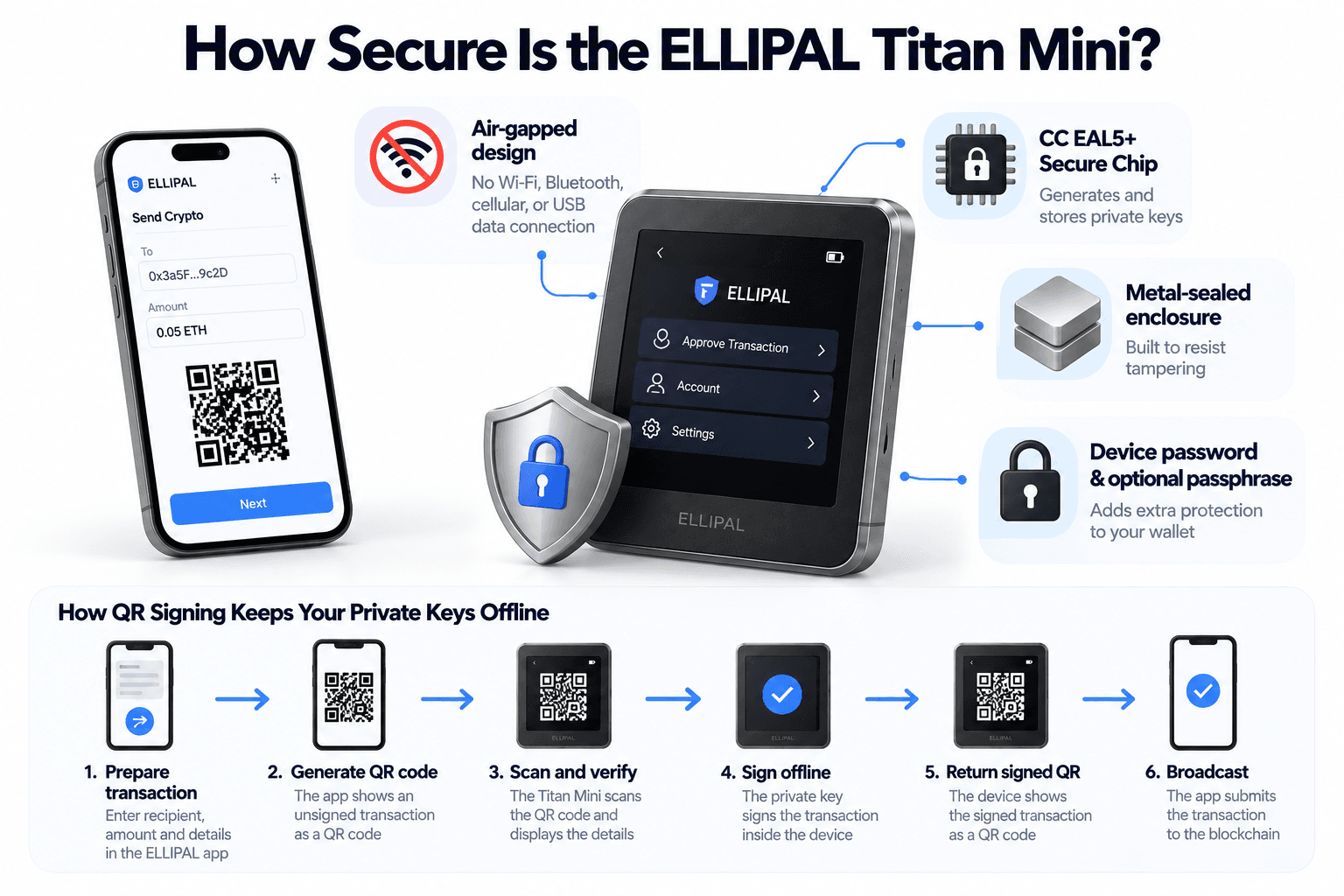
The Titan Mini is designed to operate without Wi-Fi, Bluetooth, cellular connectivity, or USB data communication. Cryptocurrency transactions are prepared on the connected smartphone and authorized separately on the offline hardware device.
The process works as follows:
- Prepare the transaction: The ELLIPAL app constructs an unsigned transaction containing the recipient, amount, and necessary network information.
- Generate the QR code: The smartphone displays the unsigned transaction data as one or more QR codes.
- Scan and verify: The Titan Mini scans the request and presents the available transaction details for review.
- Sign offline: After approval, the Mini uses its internally stored private key to produce a digital signature.
- Return the signed transaction: The hardware wallet displays signed QR data for the smartphone to scan.
- Broadcast to the blockchain: The connected app submits the authorized transaction to the relevant network.
Throughout normal signing, the private keys and public keys serve different purposes. Public account information can be shared with the app for receiving funds and monitoring balances, while the private signing credentials remain inside the hardware wallet.
This limits a common attack route involving malware on an internet-connected computer or smartphone. A compromised mobile app cannot ordinarily request the wallet's private keys through a direct Bluetooth or USB communication channel because those channels are absent.
Secure Element, Anti-Tamper Protection, and Firmware Transparency
The Titan Mini's physical security combines a Secure Chip, metal-sealed construction, a device password, and optional passphrase-based wallet separation. These mechanisms address different threats, from unauthorized access to attempted extraction of key material.
Secure Chip and Certification
ELLIPAL's current specifications advertise a CC EAL5+ Secure Chip responsible for generating and storing sensitive wallet credentials.
Common Criteria Evaluation Assurance Levels refer to evaluations performed against defined security targets. A certified component can provide evidence of resistance to particular attacks, depending on the evaluated design and certification scope.
A chip-level certification does not automatically establish that the complete wallet, its firmware, QR transaction parser, and mobile application have undergone the same evaluation.
The distinction is relevant because older ELLIPAL reviews questioned whether previous devices incorporated a conventional secure element.
Tamper Resistance and Password Controls
The Mini uses a metal-sealed enclosure intended to resist unauthorized physical access. ELLIPAL also advertises an automatic key-wiping mechanism that activates when physical tampering or disassembly is detected.
If the mechanism operates as intended, it could prevent an attacker from retrieving the stored keys after triggering the device's tamper detection. Its effectiveness depends on the detection mechanism and whether an attacker can bypass it.
The device password provides access control during normal operation. Users can also enable an optional BIP39 passphrase, which changes the wallet derived from the recovery phrase.
An account protected by an additional passphrase cannot be reproduced using the recovery words alone. This can help when the recovery phrase is exposed, although forgetting the exact passphrase can permanently prevent access to the associated accounts.
Firmware Transparency
Firmware updates use signed packages delivered through the device's offline microSD workflow.
ELLIPAL has published an upgrade-file verification tool that provides visibility into part of its firmware-update verification process.
However, publishing an update-verification tool is different from publishing the complete wallet firmware. The Titan Mini's core software is not fully open-source, limiting independent inspection of its signing implementation and other security-sensitive operations.
Users who require independently inspectable firmware may therefore prefer a hardware-wallet manufacturer with a more extensive public-source development model.
What Are the Titan Mini's Security Limitations?
The Titan Mini's air-gapped design reduces exposure to direct remote attacks, but its security still depends on how users protect recovery information, evaluate transaction requests, and maintain the device.
| Threat | Protection Provided | Remaining Risk |
|---|---|---|
| Remote malware | No conventional online connection to the private-key storage device | Malware can prepare fraudulent signing requests |
| Physical tampering | Metal enclosure and advertised automatic key wipe | Real protection depends on implementation |
| Recovery-phrase theft | Recovery credentials generated offline | An exposed phrase can allow wallet restoration elsewhere |
| Phishing | Hardware confirmation before outgoing transfers | Users can authorize fraudulent transfers |
| Malicious DApps | Separate hardware signing | Harmful permissions may be approved unknowingly |
| Compromised mobile app | Private keys remain separate during normal signing | The app can display misleading account or transaction information |
| Supply-chain interference | Device enclosure and security controls | Modified or substituted hardware remains possible |
| Firmware compromise | Signed updates and offline installation | Proprietary firmware limits independent inspection |
The most immediate risk for active users involves signing an unfamiliar transaction.
The smaller touchscreen may complicate this process when a signing request contains information that the device cannot display clearly. Users should reject requests they cannot understand or independently verify.
Our guide to hardware-wallet mistakes covers blind signing, recovery-phrase exposure, unsafe purchase channels, and other failures that hardware protections alone cannot prevent.
How Easy Is the ELLIPAL Titan Mini to Set Up and Use?
The Titan Mini is designed around a straightforward separation of responsibilities: wallet creation and transaction signing happen on the hardware, while the smartphone manages account information and blockchain access.
A beginner can follow the intended workflow without specialized equipment, although safe setup requires careful handling of the recovery phrase and an understanding of the QR-based authorization process.
First-Time Setup and Wallet Creation
Setting up the Titan Mini begins with inspecting the device and installing the official mobile application. New users should create their wallet directly on the hardware rather than importing credentials that may already have been exposed through connected software.
The process follows these steps:
- Inspect the packaging and device: Check the enclosure and supplied accessories for visible damage or interference. Avoid using a device with an unfamiliar preconfigured wallet.
- Install the ELLIPAL app: Download the official application using ELLIPAL's links to the Apple App Store or Google Play.
- Create a new wallet: Power on the Mini, select the wallet-creation option, and configure the device password.
- Record the recovery phrase: The Mini generates a 12-word recovery phrase offline. Write the words in their exact order using the supplied card or another secure physical backup.
- Set an optional passphrase: Advanced users can configure BIP39 passphrase protection for additional account separation.
- Connect the app: Scan the device's account QR codes using the app to synchronize the relevant public wallet information.
- Verify the account: Check the receiving address and confirm that the recovery information has been recorded accurately before depositing substantial assets.
The recovery phrase is the most sensitive information generated during setup. Anyone who obtains the correct phrase and applicable passphrase may be able to recreate the wallet and control its assets.
Users restoring an existing wallet follow a different process. They import the previous recovery credentials rather than generating new ones. The restored account may also depend on its original passphrase, blockchain, derivation path, and address format.
Sending, Receiving, and Verifying Transactions
Once the wallet is configured, the ELLIPAL app becomes the main interface for monitoring cryptocurrency balances and preparing transactions.
Receiving funds is comparatively simple. The app displays the relevant wallet address, which can be shared with the sender without exposing the private key.
For substantial deposits, users should confirm that the address corresponds to the intended hardware-wallet account rather than relying entirely on information displayed by a potentially compromised smartphone.
Sending cryptocurrency requires the Mini.
Consider a user transferring 0.02 BTC to another Bitcoin wallet. The recipient address and amount are entered through the mobile app, which prepares the unsigned transaction and displays its QR code.
The Mini scans the transaction request. After the user reviews and authorizes the available details, the hardware signs the transaction and displays the signed QR data for the app to scan.
The app then broadcasts the signed transaction to the Bitcoin network.
This creates two different operating experiences. Portfolio balances can be monitored through the phone without the Mini, while outgoing transfers require access to the hardware device.
The extra scanning steps can slow frequent transactions. A simple Bitcoin payment may involve a manageable exchange of QR data, but complex transactions can require multiple QR frames or additional interaction.
Mobile App Experience and Offline Firmware Updates
The ELLIPAL app manages the connected side of the Titan Mini's workflow, including portfolio tracking, transaction preparation, supported DApps, and third-party financial services.
ELLIPAL released App 5.0 on Sept. 22, 2026, introducing a redesigned home screen, an updated sending process, improved wallet switching, and changes to asset management. The revised sending interface organizes a transfer around its address, amount, and signing stages. This helps users follow transaction progress while retaining the Mini's offline authorization process.
The mobile app also remains central to the wallet's long-term usability, particularly because firmware updates are handled separately from ordinary transactions.
Offline Firmware Updates
The Mini's firmware is updated through a security adapter and microSD card. Users obtain the relevant firmware package from an authenticated ELLIPAL source, transfer it to the card, and initiate the update on the device.
This avoids transferring firmware through a conventional USB data connection directly to the wallet.
The process does require functioning accessories, adequate battery power, and a correctly prepared update package. Problems with card formatting, compatibility, or interrupted installation may prevent the update from completing normally.
The Mini remains usable within ELLIPAL's supported cold-wallet environment, although future mobile operating-system changes and manufacturer support policies can affect access to the app and its integrations.
Which Cryptocurrencies, DApps, and Advanced Features Does the Titan Mini Support?
The Titan Mini supports mainstream cryptocurrencies alongside thousands of tokens issued on compatible blockchains. Its mobile application also provides DApp connectivity, swaps, purchasing services, and selected staking workflows.
Supported Coins, Blockchains, and NFTs
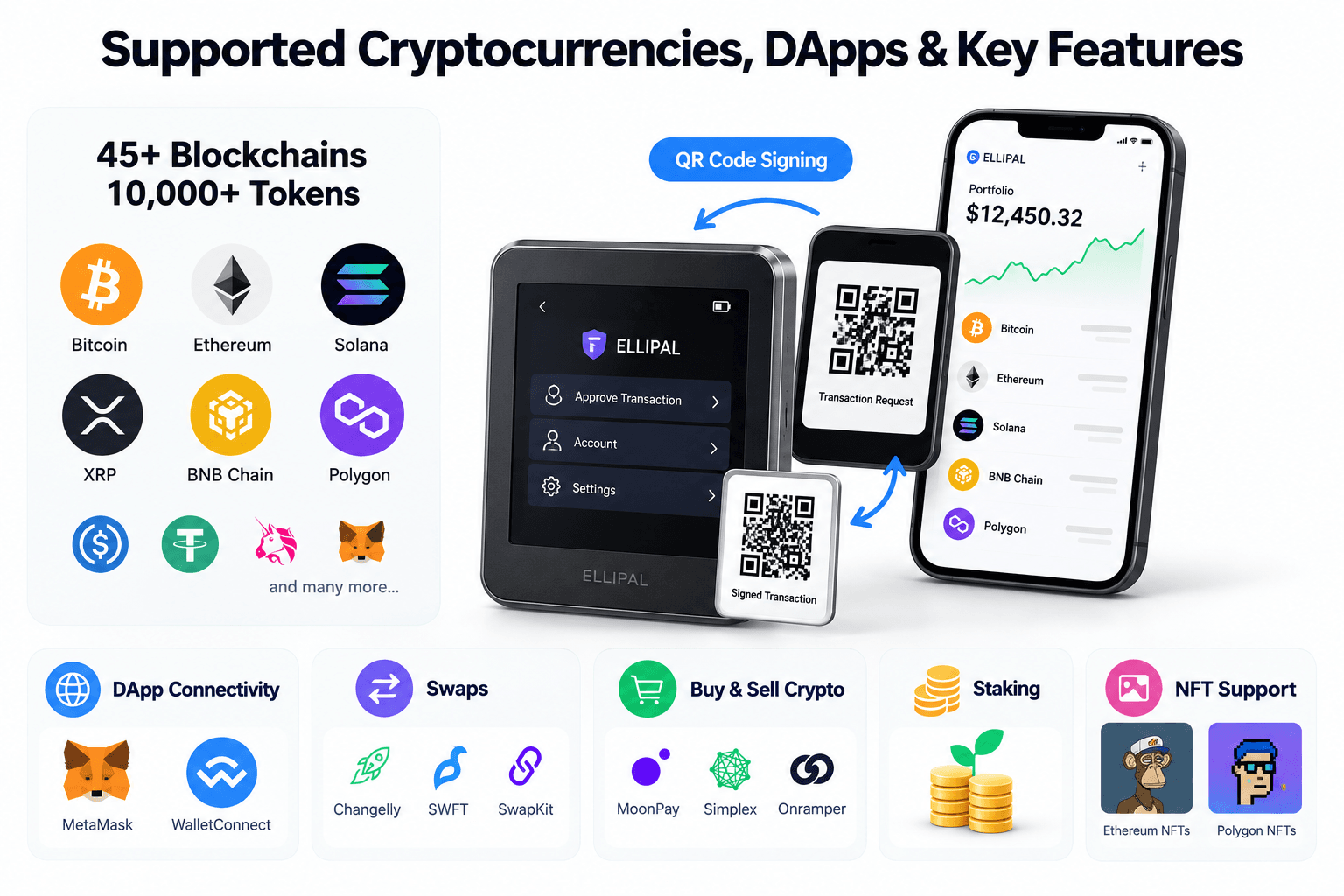
ELLIPAL currently advertises more than 45 supported blockchains and over 10,000 tokens for the Titan Mini. Among the supported ecosystems are Bitcoin, Ethereum, Solana, and the XRP Ledger.
Each network has its own transaction formats, account requirements, and token standards, so support for one blockchain cannot be used to infer compatibility with another.
| Asset or Network | Advertised Support | Available Functionality and Limitations |
|---|---|---|
| Bitcoin (BTC) | Supported | Ordinary transfers; advanced Bitcoin workflows require separate verification |
| Ethereum (ETH) | Supported | ETH transfers, supported tokens, and compatible contract transactions |
| ERC-20 tokens | Supported on Ethereum | Requires the correct token contract and network |
| Solana (SOL) | Supported | Transfers and supported tokens; DApp compatibility varies |
| XRP Ledger (XRP) | Supported | XRP transactions; account activation and destination tags may apply |
| BNB Chain | Supported | BNB and supported network tokens |
| Polygon | Supported | Network assets, tokens, and supported NFTs |
| Ethereum and Polygon NFTs | Advertised | Functionality depends on supported NFT standards and app operations |
ELLIPAL's current coin compatibility directory provides the starting point for checking supported assets and networks.
The distinction between coins and tokens becomes particularly relevant when using stablecoins.
For example, USDT and USDC can exist on multiple blockchains. A wallet that supports an ERC-20 version does not necessarily support every version issued on other networks.
Sending a token through an unsupported network can complicate recovery or permanently strand funds.
The same principle applies to NFTs. ELLIPAL advertises support for Ethereum and Polygon NFTs, but users should confirm the specific token standard, marketplace operation, and transfer method before assuming a collection is fully compatible.
The advertised token count therefore describes the scale of supported assets, while the actual buying decision should be based on the exact network and operations a user needs.
DApp Connectivity, MetaMask, Swaps, and Staking
The ELLIPAL app extends the Mini beyond ordinary cryptocurrency transfers by connecting users with supported decentralized applications and external financial services.
These interactions still require offline signing through the hardware wallet, but the transaction requests originate from connected software and, in some cases, third-party providers.
DApp Connectivity and MetaMask
ELLIPAL advertises integration with MetaMask and WalletConnect, allowing supported decentralized applications to communicate with the wallet environment.
WalletConnect acts as a communication protocol between an application and a compatible wallet interface. A DApp can request account information or propose a transaction, while authorization remains with the wallet.
For a Titan Mini user, supported transaction requests are prepared through the connected application and ultimately signed using the hardware's QR workflow.
This can accommodate transactions involving token swaps, decentralized exchanges, and compatible smart contracts.
However, connecting through WalletConnect does not establish compatibility with every contract function, transaction type, or network. Support depends on the wallet software, signing implementation, and specific DApp.
ELLIPAL's MetaMask integration similarly requires verification for the intended workflow.
Swaps and Cryptocurrency Purchases
The ELLIPAL app lists third-party swap providers including Changelly, SWFT, and SwapKit. It also provides cryptocurrency purchase and sale options through services such as MoonPay, Simplex, and Onramper.
Users can initiate eligible transactions from the app while retaining hardware authorization over the relevant signing operations.
Execution remains dependent on the provider. Swaps can involve quoted spreads, service fees, slippage, and network transaction fees, while fiat purchases may include payment-processing costs and identity-verification requirements.
Cross-chain swaps can introduce further dependencies involving bridges, liquidity providers, and settlement infrastructure.
Users should compare the final amount received and applicable terms before selecting a provider, particularly when moving between different networks.
Staking
As of Oct. 24, 2025, ELLIPAL lists staking support for ETH, ADA, ATOM, XTZ, DOT, and KSM, with certain services supported by third-party infrastructure providers such as Kiln.
The current app listing describes Solana staking as forthcoming.
Available rewards are also variable. Validator performance, service commissions, network conditions, and unstaking periods can affect the outcome.
Our staking guide explains how reward generation and validator participation work across Proof-of-Stake networks.
For Mini users, hardware signing helps protect the authorization process, but it does not prevent token-price declines, validator penalties, slashing, or losses caused by vulnerable third-party protocols.
Bitcoin Features and Advanced Compatibility Limitations
The Titan Mini supports conventional Bitcoin custody and transactions, although its compatibility with specialist Bitcoin software and advanced signing workflows is less comprehensively documented.
For users holding BTC in a standard account, receiving and sending transactions may be sufficient. Those operating watch-only wallets, custom nodes, or multisignature setups need more precise compatibility information.
ELLIPAL's current Taproot documentation confirms support for Titan-series devices running firmware version 4.12.0 or later.
The instructions describe updating the firmware and application, re-importing the wallet, reconnecting it through QR codes, and switching to the available Taproot address.
Legacy, Nested SegWit, and Native SegWit formats are also described across ELLIPAL's Bitcoin support materials.
| Bitcoin Capability | Current Status | Practical Consequence |
|---|---|---|
| Standard BTC transfers | Supported | Suitable for ordinary sending and receiving |
| Legacy addresses | Advertised | Supports older Bitcoin address formats |
| Nested SegWit | Advertised | Provides compatibility with supported SegWit accounts |
| Native SegWit / BIP84 | Address format advertised; exact Mini derivation behavior not independently tested | Verify restoration paths and account discovery |
| Taproot / BIP86 | Titan-series support documented for firmware 4.12.0+ | Requires compatible firmware and configuration |
| xpub export | Not independently verified | Watch-only account workflows may be limited |
| PSBT signing | Not independently verified | Compatibility with external PSBT tools should not be assumed |
| Multisignature signing | Not independently verified | Specialist multisig setups require explicit confirmation |
| External Bitcoin wallet software | Comprehensive Mini-specific compatibility not verified | Sparrow, Electrum, and similar tools need individual validation |
| Custom RPC endpoints | Not independently verified | Users requiring custom infrastructure should confirm support |
| Testnet availability | Not independently verified | Developers may need alternative hardware |
Bitcoin wallets can derive several accounts from the same recovery phrase using different conventions. Hierarchical deterministic wallets use derivation paths to generate related keys and addresses, which explains why imported recovery credentials do not always display the expected account immediately.
Extended public keys, commonly called xpubs, allow external applications to monitor account activity and derive public receiving addresses without possessing the private signing credentials.
PSBTs serve a different purpose. They allow an unsigned or partially signed Bitcoin transaction to be transferred between compatible applications and signers, including devices participating in multisignature arrangements.
These workflows are commonly used by advanced Bitcoin holders who prefer independent watch-only software, collaborative custody, or controlled signing procedures.
The Mini is therefore easier to recommend for standard BTC holdings than for complex Bitcoin infrastructure or specialist security arrangements.
What Happens If You Lose, Break, or Cannot Access the ELLIPAL Titan Mini?
Losing or damaging the Titan Mini does not automatically result in the loss of its associated cryptocurrency. Assets remain recorded on their respective blockchains, while the hardware wallet stores the credentials required to authorize transactions.
Recovery depends on retaining the correct recovery information and using a compatible wallet capable of reproducing the original accounts.
Recovering Crypto After Device Loss or Damage
The Titan Mini uses the BIP39 recovery standard, allowing users to reconstruct wallet credentials from a sequence of recovery words.
The device normally generates a 12-word phrase when creating a new wallet and supports importing recovery phrases containing 12, 15, 18, 21, or 24 words.
If the original Mini is damaged or lost, users can restore compatible accounts on a replacement ELLIPAL device using the recorded credentials.
Restoration may also be possible on another BIP39-compatible hardware wallet.
A suitable recovery record includes:
- Recovery phrase: All words in the correct sequence.
- Passphrase: The exact additional phrase, if enabled.
- Networks and accounts: Information identifying the cryptocurrencies and accounts originally used.
- Derivation settings: Any non-default paths or address formats.
- Recovery method: A compatible device or software environment capable of recreating the relevant accounts.
For users maintaining long-term self-custody, the quality of the backup determines whether funds remain accessible after hardware failure.
The recovery phrase should be protected separately from the device and never shared with anyone claiming to offer account verification or technical support.
A lost Mini can be replaced. A lost device combined with missing recovery credentials may leave the assets permanently inaccessible.
Firmware Failures, App Dependence and Long-Term Access
A failed firmware update, damaged battery, or unavailable mobile application can interrupt normal access to the wallet without changing the blockchain balances it controls.
The appropriate recovery route depends on which component has failed and whether valid recovery information remains available.
| Scenario | Immediate Problem | Recovery Implication |
|---|---|---|
| Lost or stolen Mini | Original signing device is unavailable | Restore on compatible hardware using complete credentials |
| Device no longer powers on | Private keys cannot be accessed through the original device | Recover supported accounts using the original backup |
| Firmware update fails | Wallet may become temporarily unusable | Follow official troubleshooting or restore using a compatible device |
| ELLIPAL app unavailable | Normal account monitoring and transaction broadcasting may stop working | Compatible recovery software or hardware may provide another route |
| Recovery phrase exposed | Someone else may be able to recreate the wallet | Move assets to new credentials through a trusted recovery process |
| Recovery phrase and device lost | No usable signing credentials remain | Funds may become permanently inaccessible |
| Passphrase forgotten | Original passphrase-derived accounts cannot be reproduced | Recovery words alone may restore different accounts |
Before resetting an unresponsive wallet, users should establish whether they still have a complete and accurate backup.
A reset removes locally stored wallet information. If the recovery phrase is missing or incorrect, a repair attempt could eliminate the owner's last usable access to the funds.
The ELLIPAL application introduces a separate long-term dependency. Future app changes, unsupported operating systems, or discontinued integrations could make ordinary account management more difficult.
Users attempting restoration should prioritize another trusted hardware wallet. Entering a cold-wallet recovery phrase into an internet-connected software wallet exposes the credentials to a less isolated environment and may permanently weaken the original security arrangement.
ELLIPAL Titan Mini vs. Titan 2.0, X Card, and Other Hardware Wallets
The Titan Mini sits between ELLIPAL's larger QR-signing Titan 2.0 and its compact NFC-based X Card. All three provide self-custody, but their display designs, signing methods, power requirements, and verification experiences differ.
Competitors such as SafePal, Trezor, and Ledger offer alternative combinations of physical isolation, firmware transparency, mobile compatibility, and specialist wallet integrations.
ELLIPAL Titan Mini vs. Titan 2.0 vs. X Card
ELLIPAL's three devices address different usage patterns. The Mini provides portable touchscreen signing, the Titan 2.0 offers a larger display for transaction review, and the X Card removes charging and camera scanning through NFC communication.
| Feature | Titan Mini | Titan 2.0 | X Card |
|---|---|---|---|
| Official US price | $79 sale / $99 regular | $169 | $69 sale / $79 regular for one card |
| Form factor | Compact handheld | Larger handheld | Credit-card-sized |
| Display | 2.7-inch touchscreen | 4-inch touchscreen | No dedicated transaction display |
| Signing method | QR code | QR code | NFC tap |
| Power | 600 mAh rechargeable battery | 1,400 mAh rechargeable battery | Battery-free |
| Network/data connection | Air-gapped QR transfer | Air-gapped QR transfer | NFC communication |
| Secure chip claim | CC EAL5+ | CC EAL5+ | CC EAL6+ |
| Firmware maintenance | Security adapter and microSD | Security adapter and microSD | No user firmware-update workflow advertised |
| Mobile interface | ELLIPAL App | ELLIPAL App | ELLIPAL App |
| Recovery | Generates 12-word BIP39 phrase | Generates 24-word BIP39 phrase | Supports 12-, 18-, and 24-word creation using the Starter |
| Advertised assets | 45+ chains and 10,000+ tokens | 45+ chains and 10,000+ tokens | 45+ chains and 10,000+ tokens |
| Main advantage | Portability with touchscreen signing | Greater viewing space | Compact and battery-free |
| Main limitation | Small display and QR scanning | Higher price and larger body | No independent screen for visual verification |
| Best fit | Occasional mobile-first transfers | Users reviewing detailed transactions | Frequent simple mobile signing |
Prices checked Oct. 24, 2026. Bundles, promotional offers, and regional totals may differ.
The Titan Mini and Titan 2.0 share the same general air-gapped signing approach. Both keep their private keys separated from conventional data connections and rely on the ELLIPAL app to prepare transactions.
The Titan 2.0's four-inch touchscreen gives users more space to inspect receiving addresses, transaction amounts, and available contract information. Its larger battery also provides greater nominal capacity, although actual runtime depends on usage.
The Mini retains the same general process in a more compact device at a substantially lower price.
The X Card replaces the QR workflow with NFC signing. Its battery-free construction removes charging and the need to align cameras, making it more convenient for repeated mobile transactions. However, the X Card lacks a dedicated display for independently reviewing transactions on the signing hardware. Users therefore rely more heavily on the connected application to understand the requested action.
For buyers choosing within ELLIPAL's lineup:
- Choose the Titan Mini for compact air-gapped signing, touchscreen controls, and a lower price than the Titan 2.0.
- Choose the Titan 2.0 for a larger verification screen, particularly when reviewing frequent or detailed transactions.
- Choose the X Card for battery-free portability and NFC convenience, provided app-based transaction visibility fits your security preferences.
The Mini offers the strongest balance for users who want a dedicated signing screen without paying for the larger Titan 2.0. The X Card becomes more attractive when portability and quick mobile interactions take priority.
ELLIPAL Titan Mini vs. SafePal, Trezor, and Ledger
SafePal S1, Trezor Safe 3, and Ledger Nano S Plus compete with the Mini at the budget and midrange levels, although they use different signing and software architectures.
| Device | Security and Connectivity | Software and Compatibility | Price and Best Fit |
|---|---|---|---|
| ELLIPAL Titan Mini | Offline QR signing, 2.7-inch touchscreen, advertised CC EAL5+ chip | Mobile-first ELLIPAL App; limited verified specialist Bitcoin integration | $79 sale; compact air-gapped storage |
| SafePal S1 | Air-gapped QR signing, smaller color screen, advertised CC EAL6+ chip | SafePal App, multichain services and DApps | $49.99; lower-budget QR signing |
| Trezor Safe 3 | USB-C, button controls, open-source firmware, CC EAL6+ chip | Trezor Suite, Bitcoin-focused features, third-party wallets | Regional pricing varies; software transparency and Bitcoin management |
| Ledger Nano S Plus | USB-C, small monochrome screen, CC EAL6+ Secure Element | Ledger Wallet app and established third-party integrations | Regional pricing varies; mainstream multichain management |
Competitor specifications checked against official SafePal, Trezor, and Ledger product listings.
SafePal S1 is the closest direct competitor to the Mini's air-gapped architecture. It uses offline QR signing, a camera, and a smaller screen operated through physical controls. At $49.99, SafePal undercuts the Mini considerably. Its plastic construction and smaller display create a different handling experience, while its accompanying application provides access to supported tokens, NFTs, and DeFi services.
Buyers focused primarily on low-cost QR signing may prefer SafePal, while the Mini offers a larger touchscreen and metal enclosure.
Trezor Safe 3 takes a different approach through USB-C connectivity, physical buttons, and an open-source firmware architecture. Its security model combines a Secure Element with software that can be publicly inspected. Trezor Suite and compatible third-party applications also support more specialized Bitcoin management workflows.
The Safe 3 is less convenient for users who specifically want a QR-based mobile wallet, but its software transparency and Bitcoin-focused features make it an appealing alternative for technically demanding holders.
Ledger Nano S Plus similarly relies on USB-C, with signing credentials protected by a Secure Element and operations managed through Ledger's software environment. Ledger advertises a CC EAL6+ chip, a compact monochrome screen, and extensive supported asset coverage. Its broader software ecosystem can offer additional options for managing compatible accounts and decentralized applications.
However, Ledger's proprietary core firmware leaves users dependent on the manufacturer's security model rather than a fully open-source implementation.
For buyers comparing those two security approaches directly, our Trezor vs. Ledger comparison examines their software transparency, recovery options, device integration, and custody controls.
The practical choice comes down to which limitations the owner is willing to accept. SafePal favors price, Trezor favors open-source firmware and Bitcoin tooling, Ledger favors established software compatibility, and the Titan Mini favors portable touchscreen hardware with offline QR signing.
Our best hardware wallets guide includes further options for users considering larger displays, alternative recovery designs, or premium cold-storage devices.
ELLIPAL Titan Mini Review Verdict: Who Should Buy It
The ELLIPAL Titan Mini remains a reasonable hardware-wallet purchase in 2026, particularly at its current price. Its compact metal enclosure, touchscreen controls, and offline QR-code signing provide a practical combination for cryptocurrency holders who want cold storage alongside smartphone-based account management.
The Mini is most suitable for users holding mainstream cryptocurrencies and making occasional transfers. It can also support selected DApp and staking activities, provided the required integration and transaction-signing functions are compatible.
Users who prioritize larger on-device transaction verification should consider the ELLIPAL Titan 2.0. SafePal S1 offers cheaper QR signing, while Trezor Safe 3 and Ledger Nano S Plus provide alternative software ecosystems and specialist wallet compatibility.
For straightforward self-custody, the Titan Mini offers a competitive combination of portability, offline signing, and touchscreen usability.