CoinTracking is our top overall crypto tax software pick for 2026.
Koinly, Summ, CoinLedger, CoinTracker, Awaken Tax, Blockpit and TokenTax address different combinations of portfolio size, jurisdiction, onchain activity and demand for professional assistance.
This guide compares the leading crypto tax software in 2026 across reporting, integrations, DeFi support, reconciliation, pricing, Form 1099-DA tools and professional assistance, so you can find the best fit for your portfolio.
Editor's Note (Sept. 1, 2026): We fully updated this guide in September 2026 to reflect current crypto tax software pricing, transaction limits, integrations and product features. The update also adds new coverage of Form 1099-DA reconciliation, DeFi and onchain tax reporting, high-volume portfolios, professional tax assistance and the common errors crypto tax software can make.
Quick Verdict: Best Crypto Tax Software in 2026
CoinTracking is our top overall crypto tax software pick for 2026 because it combines detailed tax reporting, portfolio tracking, broad exchange and wallet support, high transaction capacity and functionality for both individual investors and tax professionals. There is no universal winner, though, because portfolios differ substantially by transaction volume, country and activity type.
| Software | Verdict | Why |
|---|---|---|
| CoinTracking | Best crypto tax software overall | Combines detailed tax reporting, portfolio tracking, 400+ import options, 25+ reports and transaction capacity extending to an unlimited tier. |
| Koinly | Best for beginners and international users | Offers guided reconciliation, transfer matching, error warnings and tax-report support across multiple jurisdictions. |
| Summ | Best for high-volume and complex portfolios | Supports large transaction histories, automatic onchain importing and published tiers extending to hundreds of thousands of transactions. |
| CoinLedger | Best for Form 1099-DA workflows | Provides a dedicated 1099-DA dashboard for comparing broker-reported information with imported transactions and cost basis records. |
| CoinTracker | Best for Coinbase and U.S. users | Combines close Coinbase integration with U.S. filing workflows, portfolio tracking and a dedicated 1099-DA portal. |
| Awaken Tax | Best for DeFi and onchain activity | Provides granular classification tools for wallets, bridges, liquid staking, perpetual futures and other complex Web3 transactions. |
| Blockpit | Best for European users | Focuses on country-specific European tax reports alongside portfolio tracking, DeFi support and optional professional services. |
| TokenTax | Best for professional tax assistance | Combines crypto tax software with CPA and enrolled-agent support, professional reconciliation and optional full tax-return preparation. |
The best option depends on how many transactions you have, where you live, which exchanges and wallets you use, whether you participate in DeFi, NFTs or derivatives, and how much manual reconciliation or professional assistance you need.
Disclaimer
This article is for education only and is not financial advice.
Disclosure
Some links in this article may be affiliate links. If you choose to use a service through these links, we may earn a commission at no additional cost to you.

Best Crypto Tax Software at a Glance
CoinTracking is our top overall crypto tax software pick, while other platforms stand out for beginners, DeFi users, U.S. tax reporting and full-service preparation.
| Rank | Software | Best For | Starting Price as of Sept. 1, 2026 | Free Access | Transaction Limit | DeFi/NFTs | 1099-DA Tools | Full-Service Help | Coin Bureau Score |
|---|---|---|---|---|---|---|---|---|---|
| 1 | CoinTracking | Best overall | $49/year | Portfolio access; tax reports require paid plan | Unlimited tier available | Yes | 1099-DA guidance; Form 8949 section assignment; wallet-by-wallet cost-basis tools; no dedicated upload dashboard publicly documented | Yes, including tax-data preparation and U.S. tax-return preparation through CPA partners | 4.8/5 |
| 2 | Koinly | Beginners/international users | $49/tax year | Up to 10,000 imported transactions; tax-report downloads are paid | 10,000 on Pro; additional 1,000-transaction packages available; no unlimited plan | Yes | 1099-DA upload workflow | Expert Review available; no full tax-return preparation | 4.6/5 |
| 3 | Summ | High-volume portfolios | $49/year | Setup and report preview | 100,000 on standard tiers; custom support up to 1 million transactions | Yes | Automatic 1099-DA comparison | No full tax-return preparation | 4.5/5 |
| 4 | CoinLedger | 1099-DA reconciliation | $49/tax report | Portfolio tracking and gains preview; reports are paid | Unlimited tier available for 10,000+ transactions | Yes | Dedicated dashboard | Expert Review and Done For You | 4.5/5 |
| 5 | CoinTracker | Coinbase/U.S. users | About $59/year for Base | Portfolio tools; tax-report access depends on plan | 10,000+ self-service; higher Full Service capacity | Yes | Dedicated portal | Full Service reconciliation | 4.4/5 |
| 6 | Awaken Tax | DeFi/onchain users | $99/year for downloadable reports | 100 transactions and gains preview; no tax export | 50,000 on published standard tiers | Yes | Yes | Full Service Bookkeeping available | 4.4/5 |
| 7 | Blockpit | European users | €49/tax year | Portfolio tracking; tax report is paid | Pricing scales above 10,000 transactions | Yes | No dedicated U.S. workflow highlighted | Expert services | 4.2/5 |
| 8 | TokenTax | Full-service tax help | $49/tax year | No equivalent free filing tier | Tier and service dependent | Yes; manual reconciliation may be required | Service/manual workflow | CPA/EA support; full tax-return filing available as an optional service | 4.1/5 |
The scores are Coin Bureau editorial assessments across the criteria described below.
How We Evaluated Crypto Tax Software
We evaluated each platform using publicly available pricing, product documentation, supported integrations, tax-reporting functionality, jurisdiction coverage, filing integrations, transaction limits and professional-service information.
Our Evaluation Criteria
The comparison considers:
- Tax reporting capabilities: Capital gains calculations, Form 8949, jurisdiction-specific reports, audit reports and related filing outputs.
- Exchange, wallet and blockchain integrations: API connections, wallet-address imports, CSV support and blockchain coverage.
- DeFi, NFT, staking and derivatives support: Whether the software can classify activity beyond straightforward spot trades.
- Cost basis and reconciliation: Transfer matching, missing-basis warnings, duplicate detection and tools for correcting transaction data.
- Supported countries and accounting methods: Jurisdiction-specific reports and methods such as FIFO, LIFO and Average Cost.
- Pricing and transaction limits: What users pay at different portfolio sizes rather than the advertised starting price alone.
- Filing and accountant integrations: TurboTax, TaxAct, H&R Block, downloadable tax reports and accountant access.
- Portfolio and tax-planning tools: Portfolio tracking, gains previews, tax-loss harvesting and tax-lot analysis.
- Customer support and professional assistance: Product support, expert reviews, reconciliation and tax preparation.
- Ease of correcting transaction data: Warnings, filters, bulk editing and other tools used to repair imported histories.
How We Determine Our Rankings
The ranking weighs overall usefulness rather than raw feature counts.
CoinTracking ranks first because its current product combines 400+ import options, 25+ reports, portfolio tracking and plans extending to unlimited transactions. The same product also serves accountants and other professional users through dedicated corporate functionality.
Specialized use cases can produce a different choice.
- Koinly is positioned for beginners and international users
- Summ for high-volume portfolios
- CoinLedger for Form 1099-DA reconciliation
- Awaken Tax for DeFi-heavy activity
- TokenTax for users seeking professional tax assistance
Coin Bureau's Crypto Tax Software Rankings
Best Crypto Tax Software in 2026
The eight platforms solve the same basic problem in different ways. Some prioritize reporting depth and long transaction histories, while others concentrate on guided reconciliation, onchain activity, regional tax reports or human assistance.
↧ Click a platform to see why it ranked, its key functionality, pricing, best use cases, pros, cons and final verdict.
1
CoinTracking: Best Crypto Tax Software Overall
Deep tax reporting, portfolio tracking and transaction capacity extending to an unlimited tier.
CoinTracking combines crypto tax reporting with portfolio tracking, historical transaction analysis and a wide range of accounting tools. Its current plans advertise more than 2.2 million investors, 400+ exchange and wallet integrations and 25+ reports, making it one of the broadest platforms in this comparison.
Why It Earned Its Position
CoinTracking ranks first because it offers one of the strongest combinations of tax reporting depth, portfolio analysis, import coverage and transaction capacity. Unlike tools focused mainly on producing an annual tax export, CoinTracking also gives users historical portfolio data, realized and unrealized gains, transaction analysis and long-term portfolio reporting.
Key Functionality
CoinTracking supports multiple accounting methods, including FIFO, LIFO, HIFO, AVCO and ACB. Its wider toolkit includes tax calculations, realized and unrealized gains, historical portfolio data, transaction analysis and more than 25 tax and portfolio reports. Separate functionality is also available for tax professionals.
Import and Reconciliation Experience
Transactions can be imported through exchange and wallet connections, APIs, CSV files and blockchain data. API-based exchange imports are available without requiring daily automation, while Starter supports manual imports. Daily Auto-Sync begins with Pro and scales by plan, with up to 10 automatically synced wallets or exchanges on Pro, 30 on Expert and 100 on Unlimited.
Transaction allowances scale from 200 on Starter to 3,500 on Pro, 20,000 to 100,000 across Expert configurations and unlimited transactions on the highest tier. Historical transactions count toward these limits.
Complex Crypto Support
CoinTracking supports activity involving DeFi, staking, yield farming, liquidity pools and NFTs. This makes it suitable for portfolios that have moved beyond simple exchange trades, although users with highly specialized onchain histories may prefer a workflow built more explicitly around transaction-level Web3 classification.
Reports and Filing Options
CoinTracking combines tax calculations with portfolio and transaction reports and supports multiple accounting methods. For U.S. users, it can generate Form 8949, Schedule D, FBAR and Form 8938 reports, as well as files for direct import into TurboTax.
CoinTracking also supports wallet-by-wallet cost-basis accounting under IRS Rev. Proc. 2024-28 through its Reallocation Report. Transactions can be assigned to the appropriate Form 8949 section, which can help users reconcile their calculated gains and losses against broker-issued Form 1099-DA information.
Users who want professional help can use CoinTracking's Full-Service offering for transaction importing, data cleanup, reconciliation and crypto tax-report preparation.
In the U.S., the Crypto & U.S. Tax Return Service extends beyond crypto-data reconciliation. CPA partners can prepare federal and state tax returns and e-file them with the IRS and state tax authorities. The service currently starts at $1,950.
CoinTracking also published a dedicated Form 1099-DA guide in July 2026. Its workflow is different from platforms built around a dedicated 1099-DA upload dashboard, but users can reconcile broker-reported transactions by assigning transactions to the appropriate Form 8949 sections and maintaining wallet-level cost basis.
Current Pricing
Starter costs $49 per year for up to 200 transactions. Pro costs $169 for up to 3,500 transactions. Expert starts at $259 and covers higher transaction volumes across multiple configurations. Unlimited costs $899 and removes the transaction cap.
- Long-term crypto investors
- Users with large transaction histories
- Investors who want tax and portfolio tracking together
- Users who want the simplest possible workflow
- Very basic exchange-only portfolios
- Users prioritizing a dedicated 1099-DA dashboard
- 400+ import options and 25+ reports
- Multiple tax methods and an Unlimited tier
- Separate tools and services for tax professionals
- Interface contains more depth than some beginners need
- Historical transactions count toward plan limits
- Dedicated 1099-DA reconciliation is less prominent
2
Koinly: Best for Beginners and International Users
Guided reconciliation, international reporting and straightforward tax workflows.
Koinly combines guided transaction importing and reconciliation with tax-report support across multiple jurisdictions. Its workflow is designed to help users identify transfers, missing data and transaction errors before generating tax reports.
Why It Earned Its Position
Koinly ranks second because it balances accessibility with broad international reporting. Its transfer-matching and error-warning tools make it easier for less experienced users to clean up a transaction history without removing the functionality needed for DeFi, NFTs and other more complicated crypto activity.
Key Functionality
Koinly includes smart transfer matching, spam detection, negative balance warnings, auto balance verification and transaction error reconciliation. Its tax calculations support FIFO, LIFO, Average Cost and other accounting methods, with available methods depending on the user's jurisdiction.
Import and Reconciliation Experience
Users can import transactions through APIs and CSV files, while Koinly also supports synchronization across EVM networks and Solana. Its reconciliation tools help distinguish transfers between a user's own accounts from disposals that may create a taxable event. The platform also highlights negative balances, missing purchase history and other inconsistencies that require review.
Complex Crypto Support
Koinly supports DeFi, NFTs, margin trading, mining, staking, lending and airdrops. This gives it enough coverage for users whose crypto activity extends beyond simple exchange purchases without making the interface feel as dense as some more advanced platforms.
Reports and Filing Options
Reporting includes Form 8949, Schedule D, international tax reports and audit reports. Koinly also supports exports to TurboTax and TaxAct.
Koinly Expert Review is available for users who want their crypto tax data checked for areas such as missing purchase history, negative balances, completeness and transaction classifications. The service reviews the crypto tax data rather than preparing the complete tax return.
U.S. users can also upload Form 1099-DA information. Koinly uses the uploaded data when preparing Form 8949 and highlights differences that may require the user to review imported transactions or transfers.
Current Pricing
The free tier imports up to 10,000 transactions but does not provide downloadable tax reports. Newbie costs $49 for up to 100 transactions, Hodler costs $99 for up to 1,000, Trader costs $199 for up to 3,000 and Pro covers up to 10,000. Additional 1,000-transaction packages are available above that level. Koinly does not offer an unlimited plan.
- Crypto tax beginners
- International users
- Users who want guided reconciliation
- Very high-volume portfolios
- Users who need an unlimited transaction plan
- Advanced users prioritizing deep portfolio analytics
- Transfer matching and multiple reconciliation warnings
- Broad international reporting
- 1099-DA, TurboTax and TaxAct workflows
- Downloadable tax reports require payment
- High transaction counts can become expensive
- Less reporting depth than CoinTracking for some advanced users
3
Summ: Best for High-Volume and Complex Portfolios
High transaction limits, automatic onchain importing and advanced tax-reporting tools.
Summ, formerly Crypto Tax Calculator, is built for transaction-heavy portfolios and users with substantial onchain activity. Its higher tiers extend well beyond the transaction limits offered by many mainstream crypto tax platforms.
Why It Earned Its Position
Summ earns the high-volume category because its standard plans extend to hundreds of thousands of transactions, while custom solutions can support even larger histories. Its automatic smart-contract importing and categorization also make it better suited to portfolios spread across wallets and protocols.
Key Functionality
Summ includes portfolio tracking, automatic transaction categorization, multiple inventory methods, tax-loss harvesting, advanced tax reports and audit reporting. Higher tiers also add deeper inventory and derivative-trading information.
Import and Reconciliation Experience
The platform automatically imports onchain activity and smart-contract transactions, giving users a workflow designed around wallet and protocol interactions rather than exchange records alone. This is particularly useful for large histories where manual classification becomes impractical.
Complex Crypto Support
Summ supports smart-contract activity and complex onchain transaction histories alongside more conventional crypto trades. Its higher-volume architecture also makes it suitable for users whose DeFi and trading activity generates large numbers of individual taxable events.
Reports and Filing Options
Reporting includes advanced tax reports, audit reports, derivative-trading information and inventory data. TurboTax support is available across paid plans.
Its U.S. 1099-DA workflow compares uploaded broker forms against the user's wider transaction history. This can identify cases where a broker reports a disposal but does not have the full acquisition history needed for accurate cost basis.
Summ is tax software rather than a complete tax-return preparation service and does not file returns on the user's behalf.
Current Pricing
Plans cost $49 for 100 transactions, $99 for 1,000, $249 for 10,000, $499 for 100,000 and $2,499 for up to 500,000 transactions. Summ also offers custom high-volume solutions for portfolios containing up to one million transactions.
- High-volume crypto traders
- Large onchain transaction histories
- Users with substantial smart-contract activity
- Users who want full return preparation
- Very simple exchange-only portfolios
- Users who do not need advanced reporting tools
- Published tiers extend to 500,000 transactions
- Automatic onchain and smart-contract importing
- Audit, tax-loss harvesting and 1099-DA tools
- Advanced functionality sits on higher tiers
- No full tax-return preparation
- More functionality than simple portfolios may require
4
CoinLedger: Best for Form 1099-DA Reconciliation
Dedicated 1099-DA reconciliation, broad integrations and multiple filing exports.
CoinLedger combines crypto tax reporting with cost-basis tracking, portfolio tools and a dedicated Form 1099-DA workflow for U.S. users.
Why It Earned Its Position
CoinLedger takes the 1099-DA category because its dedicated dashboard lets users compare broker-reported proceeds and basis information against the transaction history calculated inside CoinLedger. That gives U.S. filers a clear workflow for finding missing or incomplete acquisition data.
Key Functionality
CoinLedger tracks cost basis, capital gains, crypto income and portfolio performance. Its current offering includes more than 1,000 integrations, unlimited exchange and wallet connections and free portfolio tracking.
Import and Reconciliation Experience
Users can import data through read-only exchange APIs, exchange CSV files, custom CSV files and wallet addresses. The 1099-DA Dashboard then lets users compare broker forms against CoinLedger's own cost-basis calculations and transaction records.
Complex Crypto Support
CoinLedger supports DeFi, NFTs and margin trading alongside standard exchange and wallet transactions. It can therefore handle a broad crypto portfolio, although its onchain classification workflow is less specialized than Awaken Tax's.
Reports and Filing Options
Tax outputs include Form 8949, capital gains reports, income reports, international reports and an audit trail. Filing exports are available for TurboTax Online, TurboTax Desktop, TaxAct, H&R Block Desktop and TaxSlayer.
Human assistance is available separately. Expert Review costs $699, while Done For You starts at $3,500 and focuses on importing, reconciliation, classification and delivery of tax reports.
Current Pricing
CoinLedger charges $49 for 100 transactions, $99 for 1,000 and $199+ for higher-volume plans. Its support documentation lists an Unlimited tier at $499 for users with 10,000 or more transactions.
- U.S. Form 1099-DA reconciliation
- Users importing from multiple exchanges and wallets
- Filers using mainstream tax software
- Users focused on international tax reporting
- Highly specialized DeFi transaction histories
- Users wanting low-cost human assistance
- Dedicated 1099-DA Dashboard
- Cost-basis and reconciliation tools
- Multiple tax-software exports
- Human-assisted services are expensive
- Pricing rises with transaction count before Unlimited
- DeFi workflow is less specialized than Awaken Tax's
5
CoinTracker: Best for Coinbase and U.S. Users
Coinbase integration, U.S. filing workflows and a dedicated 1099-DA portal.
CoinTracker is closely integrated with the U.S. crypto tax ecosystem, including Coinbase, TurboTax and H&R Block. It also combines automated account synchronization with cost-basis tracking and portfolio monitoring.
Why It Earned Its Position
CoinTracker earns this category because of its longstanding Coinbase relationship and its wider U.S. filing connections. In 2026, it entered its sixth year as Coinbase's preferred crypto tax partner, while its own filing tools include a dedicated 1099-DA portal.
Key Functionality
CoinTracker includes cost-basis calculations, portfolio tracking, automated account synchronization and smart transfer detection. Higher tiers add tax-loss harvesting, tax-lot analysis and more flexible cost-basis settings.
Import and Reconciliation Experience
Current product information describes more than 600 integrations with automated API or wallet synchronization. Smart transfer detection helps identify movements between a user's own accounts, while the 1099-DA portal compares broker forms with CoinTracker's transaction and cost-basis records.
Complex Crypto Support
CoinTracker supports DeFi and NFT activity alongside exchange and wallet transactions. Higher plans are better suited to investors who need tax planning and more flexible cost-basis controls.
Reports and Filing Options
CoinTracker supports filing workflows with TurboTax and H&R Block and also lets users share access with a CPA or tax professional.
Full Service includes professional reconciliation and supports up to 300,000 transactions in its stated allowance. Additional transactions may carry another fee. The underlying infrastructure may process higher volumes, but that should not be treated as the included transaction allowance at the base price.
Current Pricing
CoinTracker's current comparison material lists Base at about $59 for 100 transactions, higher plans around $199 to $249 at 1,000 transactions and a top self-service tier around $599 for 10,000+ transactions. Full Service starts at $3,499 per year.
- Coinbase users
- U.S. crypto taxpayers
- Users who want CPA sharing and filing integrations
- Price-sensitive international users
- Users seeking full return preparation at low cost
- Very high-volume DIY portfolios
- Coinbase, TurboTax and H&R Block connections
- Dedicated 1099-DA portal
- CPA sharing and portfolio tracking
- Self-service pricing rises at higher transaction counts
- Full Service carries a substantial additional cost
- Full Service is not the same as complete return preparation
6
Awaken Tax: Best for DeFi and Onchain Users
Specialized classification for bridges, liquid staking, perpetual futures and Web3 activity.
Awaken Tax is designed around onchain transaction histories, including self-custody wallets, bridges, staking activity and decentralized derivatives. Its controls give users more direct influence over how unusual Web3 transactions are classified.
Why It Earned Its Position
Awaken earns the DeFi category because it provides dedicated treatment controls for activity that is often difficult for generic crypto tax software to interpret automatically. Bridges, liquid staking tokens, staking swaps, perpetual futures and other onchain transactions can all require more granular classification.
Key Functionality
Users can customize the tax treatment of wrapping, bridges, liquid staking tokens, staking swaps and airdrops. The platform also supports manual overrides, transaction editing and the ability to undo individual or multiple previous edits.
Import and Reconciliation Experience
Awaken supports automatic imports across Bitcoin, Ethereum and other EVM networks, Solana and centralized exchanges. Supported bridge transactions can be matched automatically when both sides of the transfer are imported, while manual bridge labels remain available when automatic recognition fails.
Complex Crypto Support
The platform supports DeFi, NFTs, staking, lending, liquidity activity and perpetual futures. Derivatives support includes automated transaction handling for platforms such as Hyperliquid and Jupiter Perps, with separate classification for position proceeds, fees, expenses and funding payments.
Reports and Filing Options
Awaken provides Form 8949, Schedule D, international reports and audit information. Its U.S. workflow also supports Form 1099-DA uploads and reconciliation before tax-report generation.
Full Service Bookkeeping is available separately for users who want professional assistance with complex transaction histories.
Current Pricing
The free Minnow plan covers 100 transactions and gains previews but does not include downloadable tax reports. Fish costs $99 for 300 transactions. Dolphin ranges from $199 to $399 for 1,000 to 5,000 transactions, while Whale ranges from $599 to $999 for 10,000 to 50,000. Full Service Bookkeeping starts at $3,000 per year.
- DeFi-heavy portfolios
- Self-custody wallet users
- Users trading perps or using bridges and LSTs
- Simple exchange-only portfolios
- Users with very low transaction counts
- Portfolios above its standard 50,000-transaction tiers
- Dedicated controls for bridges, LSTs and perpetual futures
- EVM, Solana and centralized-exchange importing
- Manual tax-treatment overrides
- Low-volume paid plans cost more than some competitors
- Complex transactions can still require manual review
- Published standard tiers stop at 50,000 transactions
7
Blockpit: Best for European Crypto Investors
Localized European tax reports, portfolio tracking and optional professional support.
Blockpit combines crypto tax calculations with country-specific reporting, portfolio tracking and professional services, with a particularly strong focus on European users.
Why It Earned Its Position
Blockpit earns the European category because its reports are localized for individual tax jurisdictions rather than simply being available to residents of those countries. Supported markets include Germany, France, Austria, Italy and Spain.
Key Functionality
Blockpit combines tax calculations with portfolio performance and cost-basis tracking. Its optional PLUS service adds transaction-level cost basis, gains and losses, sale simulations, tax-optimization information and daily synchronization.
Import and Reconciliation Experience
Transactions can be imported from exchanges, wallets, blockchains and DApps. The portfolio tracker supports API, public-key and CSV imports, allowing users to bring centralized and onchain activity into the same reporting environment.
Complex Crypto Support
Blockpit supports DeFi, NFTs and derivative activity in addition to conventional exchange trades and wallet transfers. This makes it suitable for European investors whose activity spans several parts of the crypto market.
Reports and Filing Options
The platform provides country-specific tax reports for supported jurisdictions. A separate Source-of-Funds report starts at €19.99 and can document the history of crypto funds for banks, exchanges and related compliance requests.
Professional assistance includes an Expert Check for €99 and Expert Service from €199 per hour. These services can help with review, account setup and transaction preparation.
CARF and DAC8 add important reporting context for European crypto users in 2026, but users still need software that supports their specific jurisdiction, accounting treatment and transaction history.
Current Pricing
Blockpit charges €49 for up to 50 transactions, €99 for 1,000, €149 for 3,000, €229 for 10,000 and €549 for more than 10,000 transactions.
- European crypto investors
- Users who need localized tax reports
- Users who may need Source-of-Funds documentation
- U.S. users focused on 1099-DA reconciliation
- Users wanting an unlimited transaction plan
- Users who need included professional assistance
- Country-specific European tax reports
- DeFi, NFT and portfolio functionality
- Expert and Source-of-Funds services
- Tax-report pricing applies per tax year
- 1099-DA tooling is not a central feature
- Expert assistance costs extra
8
TokenTax: Best for Full-Service Crypto Tax Help
Crypto tax software backed by CPAs, enrolled agents and optional full return preparation.
TokenTax combines crypto tax software with access to CPAs, enrolled agents and professional tax services. Its higher tiers are aimed at users who want more human involvement than standard DIY tax platforms provide.
Why It Earned Its Position
TokenTax takes the full-service category because professional assistance is central to its offering. Users can move from self-service tax software into advanced reconciliation, tax consultations and optional complete tax-return preparation.
Key Functionality
Basic includes Form 8949, income reports, an IRS audit trail and TurboTax integration. Supported inventory methods include FIFO, LIFO and Specific ID, with Average Cost available where relevant. Higher tiers add tax-loss harvesting, manual ICO and OTC imports, Ethereum gas-fee reporting and more advanced trading calculations.
Import and Reconciliation Experience
TokenTax supports centralized-exchange activity and provides automatic CSV imports on its Pro tier. Higher service levels add professional reconciliation for users whose histories require manual cleanup or interpretation.
Complex Crypto Support
DeFi and NFTs are supported from the Basic tier, while Pro adds margin and options PnL calculations. VIP is designed for more complicated DeFi and NFT portfolios and includes advanced reconciliation and tax-expert consultations.
Some DeFi data can still require manual reconciliation when transactions cannot be imported or categorized cleanly.
Reports and Filing Options
Reports include Form 8949, income reports and an IRS audit trail, with TurboTax integration available. TokenTax also provides professional assistance through CPAs and enrolled agents.
Full tax-return filing is available as an optional service and may carry additional fees. VIP adds advanced reconciliation and tax-expert consultations for users with more complicated portfolios.
Current Pricing
Basic costs $49, Premium $199, Pro $1,999 and VIP $3,499 per tax year. Additional transaction packages and tax-return filing services can increase the final cost.
- Users who want professional tax help
- Complex DeFi and NFT portfolios
- Users considering full return preparation
- DIY users who only need basic software
- Price-sensitive high-volume traders
- Users who do not need professional reconciliation
- CPA and enrolled-agent access
- Margin, options and professional reconciliation support
- Form 8949, audit trail and TurboTax support
- Pro and VIP pricing is high
- Some DeFi activity can still require manual work
- Lower tiers have tighter transaction limits
Which Crypto Tax Software Is Best for Your Portfolio?
A centralized-exchange investor, an active DeFi wallet and a trading bot can generate very different reporting problems even when their portfolio values are similar.
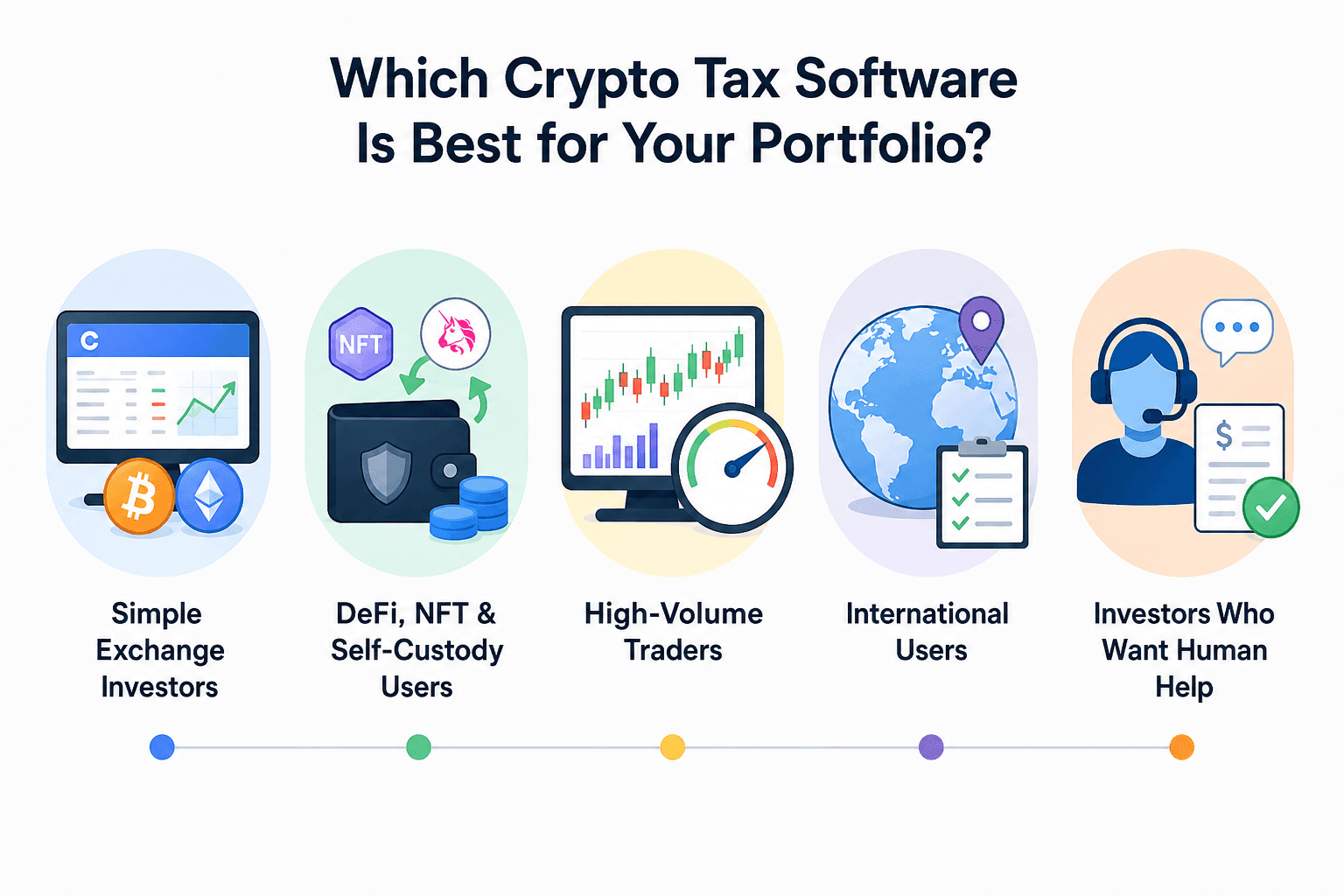 Matching Crypto Tax Software to Different Portfolio Types
Simple Exchange Investors
Users primarily buying and selling through Coinbase, Kraken or another centralized exchange generally need reliable API or CSV imports, correct transfer matching, straightforward capital-gains calculations and Form 8949 output.
CoinTracking, Koinly and CoinTracker all fit this profile. CoinTracking combines the tax workflow with longer-term portfolio reporting, Koinly emphasizes guided reconciliation, and CoinTracker has particularly close connections with the Coinbase and U.S. filing ecosystem.
DeFi, NFT and Self-Custody Users
Onchain portfolios need more than wallet-address importing. The software must recognize transfers, smart-contract interactions and activity involving DEXs, liquidity pools, bridges, staking and NFTs.
Ethereum and Solana wallets can contain hundreds or thousands of transactions that do not resemble conventional buys and sells.
Awaken, Summ and CoinTracking are the main candidates from this comparison. Awaken provides granular controls around bridges, LSTs and perpetual futures, Summ combines automated onchain importing with higher transaction tiers, while CoinTracking brings DeFi activity into a broader portfolio and tax-reporting system.
High-Volume Traders
High-volume users should compare transaction ceilings, derivatives support, API and CSV importing, bulk editing and the effective annual cost at their actual transaction count.
Activity from trading bots, margin, futures and perpetual futures can generate far more tax records than the number of assets in the portfolio suggests.
Summ publishes standard pricing through 500,000 transactions. CoinTracking offers Expert configurations and an Unlimited tier. CoinTracker provides higher transaction capacity through its upper plans and Full Service product, while TokenTax adds professional reconciliation for portfolios where complexity rather than raw transaction volume is the main problem.
International Users
A platform may accept customers in a country, support the local accounting method, generate jurisdiction-specific reports or provide access to tax professionals familiar with that market.
CoinTracking generates country-specific tax reports for 22 countries, including the United States, United Kingdom, Germany, France, Czechia, Spain, Italy, Canada and Australia. For users outside its country-specific reporting markets, it also provides a configurable General Tax Report that can be adapted to other jurisdictions.
Koinly publishes country-specific tax-report support for markets including the United States, United Kingdom, Canada, Australia and Germany. Blockpit concentrates more heavily on European jurisdictions.
Investors Who Want Human Help
Human assistance falls into four different levels:
- DIY: The software imports transactions, calculates taxes and produces reports, while the user handles reconciliation and filing.
- Software + review: A tax specialist checks the user's prepared data and identifies problems.
- Reconciliation service: A specialist helps rebuild, categorize and correct transaction histories.
- Full tax-return preparation: A CPA, enrolled agent or other qualified professional prepares the tax return itself.
TokenTax remains our pick for full-service crypto tax help, while CoinTracking also offers a U.S. Crypto & Tax Return Service through CPA partners that can prepare federal and state returns and e-file them with the relevant tax authorities.
CoinLedger provides Expert Review and Done For You services, while CoinTracker's Full Service concentrates on account management and reconciliation. Users should check whether the quoted service includes preparation and filing of the actual tax return or only preparation of the underlying crypto tax data.
Crypto Tax Software Pricing Compared
Crypto tax software pricing changes sharply with transaction volume. A $49 entry price says little about what an active trader with 10,000 or 100,000 transactions will actually pay.
What Crypto Tax Software Costs at Different Transaction Volumes
The table uses the lowest publicly documented paid tier capable of producing tax reports at each transaction level. Where a company does not publish the exact high-volume amount, the table says so rather than estimating it.
Prices checked: Sept. 1, 2026
| Tax Software | 100 Transactions | 1,000 Transactions | 3,000 Transactions | 10,000 Transactions | 100,000 Transactions | Unlimited / Higher Volume |
|---|---|---|---|---|---|---|
| CoinTracking | $49 | $169 | $169 | From $259 Expert | Expert tier available | $899 Unlimited |
| Koinly | $49 | $99 | $199 | Pro plan | Pro + transaction add-ons | No unlimited plan |
| Summ | $49 | $99 | N/A | $249 | $499 | Custom support up to 1 million transactions |
| CoinLedger | $49 | $99 | From $199 | $499 Unlimited | $499 Unlimited | $499 Unlimited |
| CoinTracker | About $59 | About $199-$249 | Higher self-service tier | About $599 | Full Service/custom | Full Service includes up to 300,000; higher capacity available |
| Awaken Tax | $99* | $199 | $399 | $599 | Custom | No public unlimited tier |
| Blockpit | €99 | €99 | €149 | €229 | €549 published 10,000+ tier; no public upper limit stated | No separately named unlimited tier |
| TokenTax | $49 | $199 | $199 | $1,999 | Additional/custom capacity | Custom |
*Awaken's free tier accepts 100 transactions but does not provide downloadable tax reports, so $99 is the relevant starting cost for a user who needs filing documents.
Transaction counting also differs between products. CoinTracking bases plan limits the total number of transactions imported across the account's history, which can move a long-time user into a higher tier even after a relatively quiet tax year.
Koinly also considers both tax-year and account-wide transaction limits when determining which plan a user needs, so a long-running account can require a higher tier than the current year's activity alone suggests.
Coin Bureau's guide to crypto portfolio trackers is useful for users who mainly need ongoing portfolio monitoring rather than annual tax-report exports.
Are Free Crypto Tax Plans Actually Free?
A free crypto tax account may include free portfolio tracking, transaction importing, tax calculations or a capital-gains preview without including the downloadable reports required for filing.
For example:
- Koinly's free plan allows up to 10,000 imported transactions and a capital-gains preview, while downloadable tax reports require payment.
- CoinLedger likewise provides free portfolio tracking and gains calculations before charging for tax reports.
- Awaken's free plan includes 100 transactions and gains previews but excludes tax-report exports.
For a filer, the useful distinction is therefore whether the free account can produce the required tax export, such as Form 8949, rather than whether transactions can be imported without payment.
Can Crypto Tax Software Handle DeFi, NFTs, Staking and Perpetual Futures?
Support varies considerably once transactions move beyond straightforward exchange activity.
| Software | DeFi | NFTs | Staking | Bridges | LSTs | Perpetual Futures | Bulk Editing |
|---|---|---|---|---|---|---|---|
| CoinTracking | Supported | Supported | Supported | Partial/manual | Partial/manual | Supported on selected integrations, including Hyperliquid; import method varies | Supported |
| Koinly | Supported | Supported | Supported | Transfer matching/partial | Partial/manual | Supported through derivatives workflows | Supported |
| Summ | Automatic onchain support | Supported | Supported | Automatic grouping where matching criteria are met; manual review for exceptions | Partial/manual | Derivative reporting supported | Supported |
| CoinLedger | Supported | Supported | Supported | Partial/manual | Partial/manual | Supported on selected integrations; coverage varies | Supported reconciliation tools |
| CoinTracker | DeFi categorization | Supported | Supported | Supported where recognized | Supported with configurable tax treatment | Supported on integrations including Hyperliquid | Supported |
| Awaken Tax | Automatic | Automatic | Supported | Automatic where both legs are recognized; manual override | Configurable | Automated on supported platforms including Hyperliquid | Supported |
| Blockpit | Supported | Supported | Supported | Partial/manual | Partial/manual | Derivatives supported | Editing/categorization tools |
| TokenTax | Supported; manual reconciliation may be required | Supported | Supported | Partial/manual | Partial/manual | Margin/options support; complex derivatives may need review | Manual/service-based |
DeFi support is too broad a label by itself. Importing an Ethereum wallet does not guarantee that the software will correctly interpret liquidity-pool tokens, bridge movements, wrapped assets, lending positions or unfamiliar smart contracts.
The difference becomes clearer with liquid staking and bridges. A platform may successfully import both transactions while still requiring the user to decide whether the movement represents a taxable disposal, a transfer or another treatment under the relevant jurisdiction.
Staking support should be assessed by how the software handles rewards and related transactions rather than whether a staking wallet can simply be connected.
Form 1099-DA and Crypto Tax Software in 2026
Form 1099-DA changes software selection for U.S. investors because broker-reported information may need to be combined with cost basis and transaction history held outside the reporting broker.
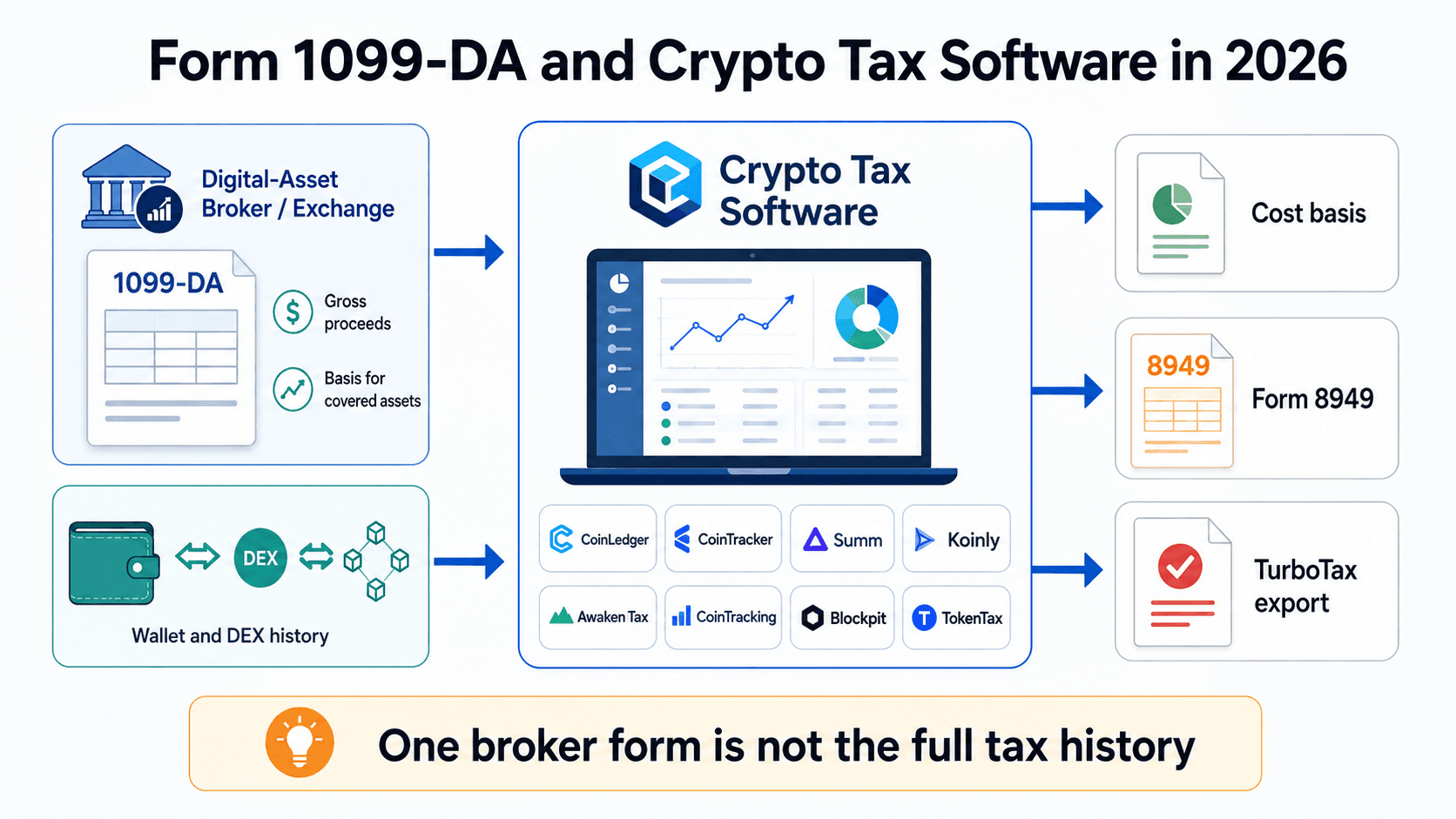 How 1099-DA Changes Crypto Tax Software Selection
What Changed for Crypto Tax Reporting in 2026?
Certain U.S. digital-asset brokers began Form 1099-DA gross-proceeds reporting for transactions occurring from Jan. 1, 2025.
For sales after 2025, brokers must report basis for covered digital assets. A digital asset generally becomes a covered security when it is acquired after 2025 in an account for which the broker provides custodial services and remains in that account until the broker effects the disposition. Basis reporting for noncovered digital assets remains voluntary.
That distinction creates a software problem when crypto moves between accounts. An exchange can know the proceeds from a sale without knowing what the investor originally paid for an asset purchased elsewhere.
Noncustodial DeFi and DEX activity can create another reporting gap because DeFi brokers are currently not required to issue Form 1099-DA. Taxable activity still has to be reported even when no information return is issued. Users can also receive multiple 1099-DAs from different platforms while maintaining self-custody wallets between them.
A complete cost-basis calculation may therefore require the user's wider transaction history rather than one broker form.
Brokers using the optional reporting methods for qualifying stablecoins or specified NFTs are not required to report basis, even where the asset would otherwise be a covered security.
Which Crypto Tax Software Can Reconcile Form 1099-DA?
| Software | 1099-DA Import | Reconciliation Tool | Cost Basis Tracking | Form 8949 | TurboTax |
|---|---|---|---|---|---|
| CoinTracking | No dedicated upload dashboard publicly documented | Form 8949 section assignment and general reconciliation | Yes, including wallet-by-wallet basis and Reallocation Report | Yes | Yes, direct export |
| CoinTracker | Yes | Dedicated portal | Yes | Yes | Yes |
| Summ | Yes | Automatic form/history comparison | Yes | Yes | Yes |
| Koinly | Yes | Guided discrepancy review | Yes | Yes | Yes |
| Awaken Tax | Yes | Reconciliation workflow | Yes | Yes | Yes |
| CoinLedger | Yes | Dedicated 1099-DA Dashboard | Yes | Yes | Yes |
| Blockpit | No dedicated U.S. dashboard highlighted | General/manual workflow | Yes | Yes | Report-export workflow |
| TokenTax | Service/manual workflow | Professional reconciliation available | Yes | Yes | Yes |
CoinTracking does not currently emphasize a dedicated 1099-DA upload dashboard, but its U.S. tax workflow provides several tools for reconciling broker information with the user's wider transaction history.
Transactions can be assigned to the appropriate Form 8949 section, while its Reallocation Report supports wallet-by-wallet cost-basis accounting under Rev. Proc. 2024-28. CoinTracking also generates Form 8949 and Schedule D and provides a direct TurboTax export.
Where Crypto Tax Software Can Get Things Wrong
Crypto tax software can automate much of the process, but incomplete transaction histories, incorrect transfer matching and complex onchain activity can still produce errors.
Missing Cost Basis and Wallet Transfers
Missing cost basis usually appears when the software can see an asset being disposed of but cannot find how or when it was acquired.
The asset may have been purchased on another exchange, transferred from a self-custody wallet, received before the connected account's imported history begins or moved through several owned wallets.
Transfers between a user's own wallets are particularly relevant. The asset's acquisition date and original basis generally need to follow it through the transaction history. Importing only the destination wallet can make the asset appear to have arrived without an identifiable acquisition.
A zero basis should therefore be investigated rather than automatically accepted. CoinLedger provides missing-cost-basis detection and reconciliation tools, while Koinly provides negative-balance warnings and automatic balance verification.
Missing, Duplicate and Incorrectly Imported Transactions
API and CSV imports can create a different set of errors.
An exchange API may expose an incomplete historical range. CSV formats can change. Closed exchanges may no longer provide records, and users can accidentally import the same history through both an API and CSV.
Historical pricing and time zones can also change calculated gains or losses if a transaction is assigned the wrong timestamp or market value.
Onchain portfolios add spam transactions and tokens that the user never intentionally acquired. Koinly includes spam detection, balance verification, advanced filtering and bulk editing, while CoinTracker provides transaction-review and reconciliation tools.
The useful checks are warnings, duplicate detection, balance verification, bulk editing and an easy way to revisit imported data. Large unexplained capital gains, negative balances or account totals that differ materially from the underlying exchange or wallet are reasons to review the transaction history before generating a final report.
Complex Onchain Transactions May Still Need Manual Review
Liquidity positions, wrapping, bridges, liquid staking, restaking, NFT activity, perpetual futures and unfamiliar smart contracts create more classification ambiguity.
A blockchain transfer shows what moved between addresses. It does not always reveal the economic purpose of the movement. The same-looking transfer can represent a wallet transfer, collateral deposit, bridge, token wrapper or taxable disposal depending on the surrounding activity and jurisdiction.
Awaken addresses part of this problem by allowing users to change the treatment of wrapping, bridging and liquid staking transactions. TokenTax similarly warns that some DeFi transaction histories require manual reconciliation.
Software alone may be sufficient when the imported history reconciles cleanly and the transaction types are correctly recognized. Professional review becomes more sensible when substantial tax amounts depend on unresolved basis, unidentified transactions or classifications the software cannot resolve with confidence.
How to Choose the Best Crypto Tax Software
 Five Practical Checks Before Choosing Crypto Tax Software
The best way to choose crypto tax software is to test it against the portfolio you actually have rather than buying the platform with the longest feature list.
- Does it support all of your exchanges, wallets and blockchains?
List every account used during the relevant tax years and check API, wallet-address and CSV support. A missing major exchange or blockchain can turn an automated workflow into manual reconstruction. - Can it correctly interpret the types of transactions you make?
Spot trades are relatively straightforward. DeFi, liquidity pools, bridges, NFTs, staking and derivatives require deeper transaction classification. - What will it cost at your actual transaction count?
Calculate the bill using your transaction history rather than the advertised entry price. Trading bots, rewards and derivatives can push the count well beyond the number of trades a user remembers making. - Does it produce the reports required in your jurisdiction?
U.S. users may need Form 8949 and 1099-DA reconciliation. Other jurisdictions use different accounting methods and reporting formats. - How easy is it to identify and repair bad data?
Look for missing-basis warnings, transfer matching, duplicate detection, balance verification, bulk editing and an audit trail.
Simple investor: Favor ease of importing, price and tax-report exports.
Complex investor: Favor reconciliation, onchain support, bulk editing, audit trails and access to professional assistance.
Someone who only bought crypto and held it without making taxable transactions may not need a full paid tax package for that year. Whether reporting is still required depends on the person's jurisdiction and other crypto activity.

Best Crypto Tax Software: Final Verdict
CoinTracking is our top crypto tax software pick for 2026 due to its combination of tax reporting, portfolio tracking, broad integration support and tools for both retail users and tax professionals. Its 400+ exchange and wallet integrations, 25+ reports and plans extending to unlimited transactions make it the top overall choice under the criteria used in this comparison.
The better fit changes once the portfolio becomes more specialized:
- CoinTracking: Best overall for broad integrations, reporting depth and long-term portfolio tracking.
- Koinly: Best for beginners and international users who want a simpler reconciliation workflow.
- Summ: Best for high-volume and complex portfolios, particularly at five- and six-figure transaction counts.
- CoinLedger: Best for U.S. users focused on Form 1099-DA reconciliation and missing cost basis.
- CoinTracker: Best for Coinbase users and investors working primarily within the U.S. tax ecosystem.
- Awaken Tax: Best for DeFi-heavy portfolios involving EVM networks, Solana, bridges, liquid staking and perpetual futures.
- Blockpit: Best for European investors who need country-specific tax reporting.
- TokenTax: Best for users willing to pay more for CPA, enrolled-agent and full-service tax assistance.
The best crypto tax software ultimately depends less on the number of integrations advertised and more on whether it can correctly reconstruct your transaction history. Start with portfolio complexity, data quality and the reports you need, then compare price.